Microsoft continues to roll-out updates and enhancements to Office 365 users. In fact, through April 2019, twenty-six new feature updates have been added to Office 365 applications. This means that end-users must stay abreast of these new features and learn how to put them to work, or they will not realize the full value of their Office 365 subscription, nor will they achieve the return-on-investment that they otherwise could or should achieve.
A great way to learn about the content included in Office updates – for both Office 365 subscribers and perpetual license users of Microsoft Office – is to visit https://docs.microsoft.com/en-us/officeupdates/ periodically. At that site, you can select your licensing model and then see all the feature updates that Microsoft has made available. With that information in hand, you can then determine which of these features you could and should be using and then make the commitment to learn how to put them to work for you. As an illustration, consider the new Line Focus feature, recently made available in Word.
The new line focus feature in word
Microsoft recently added a new feature to the Office 365-based version of Word that will help you to focus on content in a Word document when you are reading or proof-reading that document. This feature – Line Focus – was first made available in April 2019 with version 1904 and will be rolling out through the monthly and the semi-monthly channels in months to come. Note that this new feature is NOT available in Word 2019.
How to Work with Line Focus
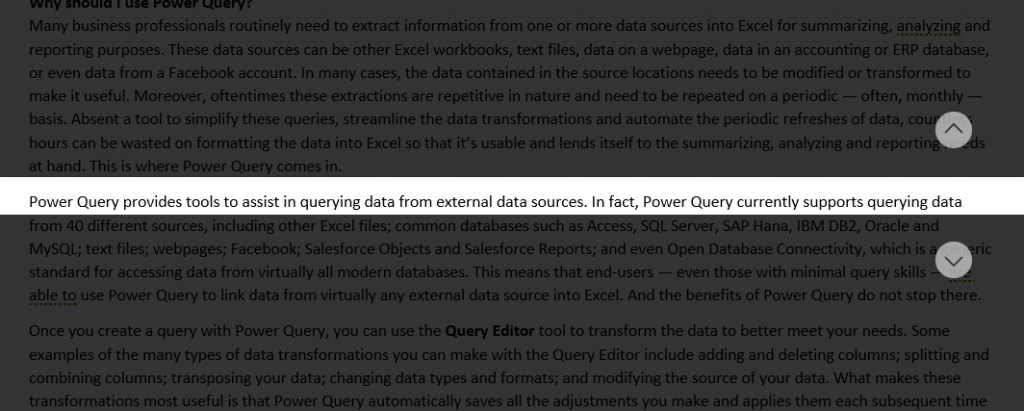
You can access Line Focus from the View tab of the Ribbon. Once you click on the View tab of the Ribbon, click Learning Tools and then click Line Focus to access this feature. When you enable Line Focus, Word then allows you to focus on one, three, or five lines at a time, helping to minimize any distractions from adjoining text or images in the document. Figure 1 provides an example of a Word document that has been “focused” to view one line at time.
We use cookies to ensure that we give you the best experience on our website. Continuing to use this website acknowledges your consent to our privacy policy.